

For years, Google Search Console gave you data—and left the interpretation to you.
Now that’s changing.
The new Google Search Console AI configuration rollout signals a shift from passive reporting to guided setup and insight surfacing. Google is starting to assist users in configuring properties, identifying gaps, and understanding performance trends—inside the interface itself.
That may sound incremental.
It isn’t.
Because once Google begins interpreting performance data for users, expectations—and competitive baselines—change.
Let’s unpack what this means depending on who you are.
What Is Google Search Console AI Configuration?
The update introduces AI-assisted setup and guidance within Search Console.
Instead of expecting users to manually:
-
- Configure all settings
- Interpret coverage reports
- Identify indexing gaps
- Spot traffic anomalies
Google now provides contextual prompts and configuration suggestions.
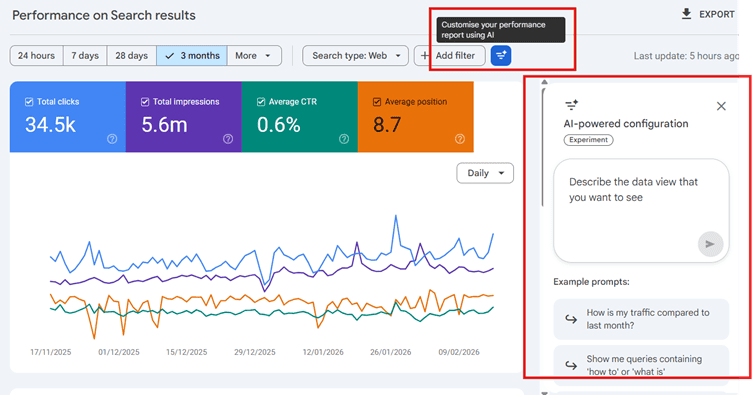
In practical terms, this could include:
-
- Highlighting incomplete setup steps
- Surfacing notable traffic changes
- Suggesting areas needing attention
- Simplifying technical language
It’s less about automation—and more about interpretation.
Why This Matters Strategically
Search Console used to be a diagnostics tool.
Now it’s becoming an advisory layer.
That aligns with broader shifts we’ve covered in our analysis of AI reshaping search visibility and reporting behavior on SEOtreasures.com. Across Google’s ecosystem, AI isn’t replacing systems—it’s guiding users through them.
When interpretation becomes embedded in the platform:
- The baseline level of SEO hygiene improves
- Non-technical users become more informed
- Performance transparency increases
And that affects everyone.
For SEO Professionals: The Competitive Floor Is Rising
If Google prompts site owners to:
- Fix indexing errors
- Submit sitemaps correctly
- Monitor Core Web Vitals
- Address declining queries
Then fewer websites will remain technically neglected.
That means your advantage won’t come from fixing obvious issues.
It will come from:
- Deeper intent mapping
- Entity authority building
- Content differentiation
- Structural architecture decisions
AI guidance raises the minimum standard.
It doesn’t replace strategic thinking.
For Small Business Owners: This Lowers Friction
If you’re running a local business site or an e-commerce store, the traditional Search Console interface can feel intimidating.
Coverage errors.
Canonical warnings.
Crawl anomalies.
The Google Search Console AI configuration helps translate these signals into a clearer direction.
But here’s the nuance:
It will tell you what needs attention.
It won’t tell you how to position your brand.
Think of it as navigation—not strategy.
For Analytics Practitioners: Watch Reporting Expectations
Once AI summaries begin surfacing inside GSC, stakeholders may start asking:
- “Why didn’t we notice this drop sooner?”
- “Google says this page lost clicks—what’s the fix?”
- “Is this a technical issue or a content issue?”
Because interpretation is now partially automated.
That increases internal visibility.
Which means your reporting needs to go beyond describing changes—you’ll need to explain causes and priorities clearly.
For SEO Tool Builders: Surface-Level Insights Won’t Be Enough
If Google embeds AI-driven interpretation natively:
Third-party dashboards that simply repackage GSC data lose differentiation.
The opportunity shifts toward:
- Cross-platform data correlation
- Predictive modeling
- Competitive benchmarking
- Scenario forecasting
If Google handles baseline explanation, external tools must deliver depth.
Practical Actions to Take Now
- Review All GSC Properties
Check whether AI prompts or configuration guidance appear across:
- Domain properties
- Subdomain properties
- URL prefix properties
Document what Google is surfacing.
- Adjust Client Communication
If clients can see AI-generated insights inside Search Console, align your reporting so you’re not just repeating what Google already shows.
Add context.
Add prioritization.
Add reasoning.
- Train Teams to Interpret AI Suggestions
AI can flag declining clicks.
But it won’t tell you whether that decline is:
- Seasonal
- Intent-driven
- SERP-layout related
- Algorithmic
Misinterpreting AI prompts can lead to reactive decisions.
Disciplined analysis still wins.
The Bigger Pattern: Google Is Owning Interpretation
This isn’t isolated.
We’ve already seen how AI Overviews are reshaping click behavior and organic CTR dynamics in search results—covered in our related SEO Treasures deep dive on AI-driven SERP visibility shifts.
Now that same philosophy is entering reporting tools.
Google doesn’t just want to show results.
It wants to shape how those results are understood.
And that changes the informational ecosystem around SEO.
Final Thought
The Google Search Console AI configuration rollout isn’t about automation replacing professionals.
It’s about Google reducing friction and shaping interpretation.
For small businesses, that’s empowering.
For SEO leaders, it’s a reminder:
If Google starts explaining the basics, your value must live beyond them.
If you’re mapping how AI is influencing both visibility and reporting ecosystems, connect this update with our broader analysis on AI-driven search evolution on SEOtreasures.com—and adapt strategically, not reactively.
Search tools are getting smarter.
Your thinking has to stay sharper.
Frequently Asked Questions on Google Search Console AI Configuration
Q. Is Google Search Console AI configuration available globally?
A. It appears to be rolling out gradually. Not every account may see identical features yet. Google often tests UI updates in phases.
Q. Does this affect search rankings?
A. No. This update impacts configuration and reporting guidance—not the search algorithm itself.
Q. Can AI fix indexing issues automatically?
A. No. It can highlight problems or missing configurations, but implementation remains manual.
Q. Should experienced SEOs rely on AI insights inside GSC?
A. Use them as prompts—not final conclusions. They’re helpful signals, but root-cause analysis still requires deeper investigation.
Q. Will this reduce the need for SEO professionals?
A. Unlikely. It simplifies onboarding and interpretation, but strategy, competitive research, and positioning remain human-driven disciplines.
Q. How does this affect agencies managing multiple properties?
A. Agencies may need to monitor how AI-generated insights influence client perception and adjust reporting clarity accordingly.
Q. Is this connected to Google’s broader AI strategy?
A. Yes. Across Search, ads, and analytics products, Google is embedding AI to assist interpretation and decision-making.
Q. Could AI prompts cause overreaction to normal traffic changes?
A. Potentially. Without context, seasonal dips or SERP layout changes might be mistaken for technical issues.
Q. Should SEO teams change workflows immediately?
A. Not drastically. Observe how the Google Search Console AI configuration behaves first. Then refine workflows based on practical impact.
Q. What’s the biggest strategic takeaway?
A. Search Console is evolving from a reporting interface into a guided performance platform. That raises the standard—but doesn’t replace expertise.